

Virtual Makeover: Change Your Hairstyle, Hair Color, and Makeup With HairLook

Ever wondered what you would look like with a completely different hairstyle, a new hair color, or a fresh makeup look? Before booking a salon appointment or changing your beauty routine, you can experiment with different looks using a virtual makeover app.
With HairLook, you can explore hairstyle transformations, try different hair colors and bangs, and experiment with makeup and facial enhancements using your own photo. Instead of imagining how a new look might suit you, you can preview different possibilities and compare your favorites.
Whether you're thinking about cutting your hair short, going blonde, trying copper hair, or refreshing your makeup, here's how to explore your next look with a virtual makeover.
What Is a Virtual Makeover?
A virtual makeover lets you experiment with your appearance digitally before committing to a real-life change. Using a photo of yourself, you can explore different beauty looks and see how various styles might look on you.
Depending on the app and its features, a virtual makeover can include:
Hairstyles: Explore different haircuts, lengths, layers, bobs, and shag hairstyles.
Hair colors: Experiment with blonde, brunette, copper, auburn, and other shades.
Bangs: See how curtain bangs, wispy bangs, blunt bangs, and other fringe styles might look on you.
Makeup: Experiment with beauty enhancements and different makeup-inspired looks.
Facial enhancements: Explore subtle visual adjustments to your appearance.
The idea is simple: test different combinations, discover styles you like, and find inspiration for your next beauty transformation.
How to Try a Virtual Makeover With HairLook
Ready to experiment with a new look? Follow these steps to explore your options with HairLook.
Step 1: Choose a Photo of Yourself
Start with a clear photo where your face is visible. Good lighting and an unobstructed view of your features can make it easier to compare different virtual looks.
Choose a photo that resembles how you usually look, so you can better evaluate the styles you try.
Step 2: Experiment With Different Hairstyles

Not sure whether short hair would suit you? Curious about a bob, a layered haircut, or a textured shag?
Explore different hairstyles to see which shapes and lengths appeal to you. You could compare a sleek short bob with a soft, layered lob or experiment with longer, face-framing layers.
You can also explore different bang styles, from curtain bangs to wispy fringe, to see how they change the overall impression of your hairstyle.
Step 3: Try a New Hair Color

Once you've explored different hairstyles, experiment with hair colors.
Perhaps you've always wanted to try blonde but aren't sure which shade to choose. Or maybe you're considering a warm brunette, a rich copper, or a softer balayage-inspired look.
Here are a few ideas to try:
Honey blonde: A warm, golden-inspired look.
Chocolate brunette: A rich brown shade for a deeper, classic appearance.
Copper and auburn: Warm red-toned colors for a noticeable change.
Ash brown: A cooler brunette option.
Balayage-inspired colors: A dimensional look with lighter pieces that blend into a darker base.

Comparing several shades can help you identify the colors you want to explore further.
Step 4: Explore Makeup and Beauty Looks
A new hairstyle isn't the only way to refresh your appearance. Makeup can also change the overall effect of a beauty look.
Use HairLook's available makeup and face-retouching features to explore beauty enhancements alongside your hairstyle experiments.
Try imagining your favorite haircut with a softer makeup look, or compare how a bold hairstyle might work with a more defined beauty look.
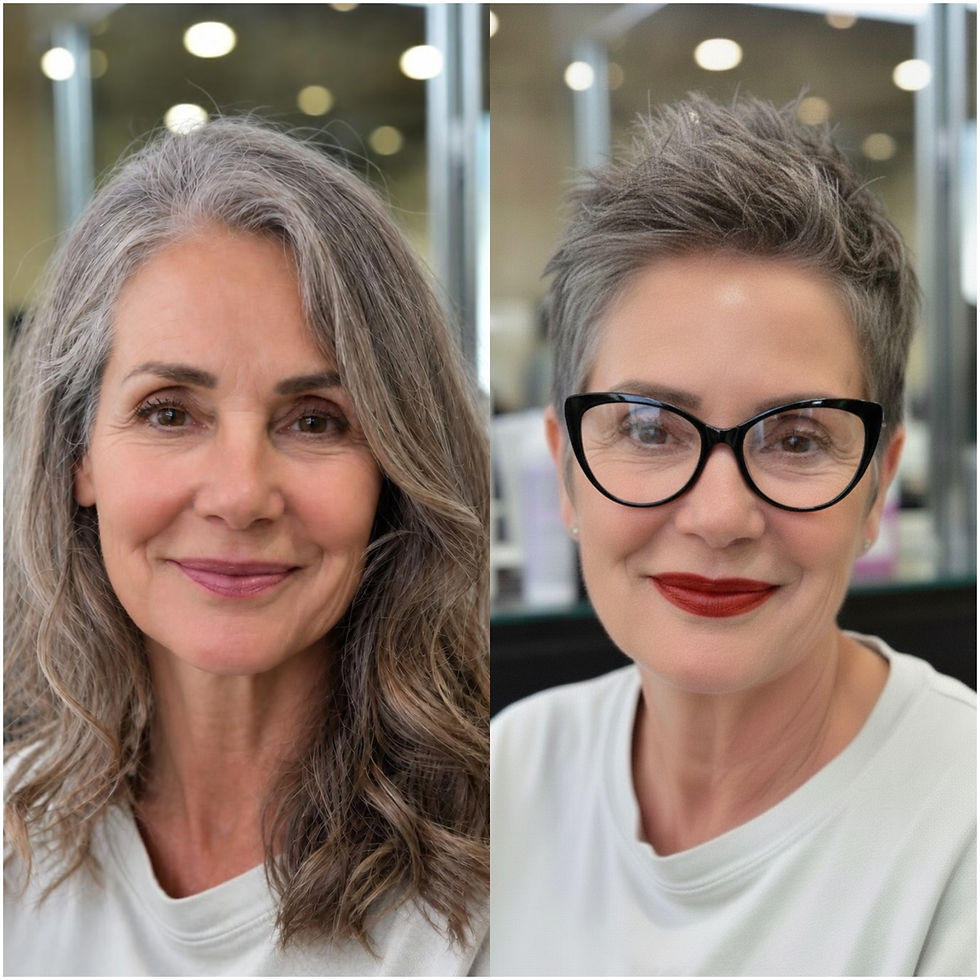
The goal isn't necessarily to change everything. Sometimes, a subtle adjustment can be all the inspiration you need.
Step 5: Combine Your Favorite Hair and Beauty Ideas
Now comes the fun part: putting the different elements together.
Instead of choosing a haircut, color, and makeup look separately, consider how they work as a complete style.
For example, you could explore:
A layered brunette haircut with soft, natural-looking makeup.
A short bob with a copper-inspired hair color.
Curtain bangs with long, flowing layers.
A blonde hairstyle paired with a fresh beauty look.
A textured shag with a more expressive makeup style.
Compare different combinations and save the results you like, where the app allows, so you can revisit your favorites.
Virtual Makeover Ideas to Inspire Your Next Look
Not sure where to start? Here are a few transformations to consider.
The Fresh Haircut Makeover
If your current hairstyle feels predictable, try a different length or shape. Compare a short bob, a longer lob, and a layered haircut to explore different directions before deciding what to ask your hairstylist for.
The Hair Color Transformation
Thinking about changing your color? Experiment with blonde, brunette, copper, or other shades before making a decision. Testing several options can help you narrow down the colors you want to discuss with a professional colorist.
The Bangs Makeover
Bangs can make a hairstyle feel completely different without requiring a dramatic change in length. Try curtain bangs, side-swept fringe, wispy bangs, or a blunt fringe to explore different possibilities.
The Complete Beauty Refresh
Sometimes you want more than a haircut. Combine a different hairstyle, a new color, and a makeup look to explore an entirely different aesthetic.
You don't have to commit to every change. Use your virtual makeover to discover which elements you like best and which ones you'd prefer to keep the same.
Why Try a Virtual Makeover Before Changing Your Look?
A virtual makeover can be a useful starting point when you're considering a beauty change but aren't ready to commit.
Explore ideas before a salon appointment. Test different hairstyles and colors to help you communicate your preferences to your hairstylist.
Compare multiple options. Rather than relying on inspiration photos of other people, you can explore looks using your own photo.
Discover styles you hadn't considered. Trying a different length, color, or bang style may inspire you to consider options outside your usual routine.
Build a clearer vision of your next look. Collect your favorite results and use them as inspiration when planning your next transformation.
Keep in mind that virtual results are visual previews, not guarantees of the final salon result. Your actual outcome can depend on your starting hair color, hair texture, hair condition, coloring technique, lighting, and other factors. Use your favorite previews as inspiration and discuss your plans with a professional stylist when needed.
Try Your Next Virtual Makeover With HairLook
You don't have to make a permanent change to explore a new version of your look.
With HairLook, you can experiment with different hairstyles, hair colors, bangs, and available makeup and facial enhancement features using your own photo. Compare your favorite ideas, discover new possibilities, and find inspiration for your next beauty refresh.
Ready to see what a new look could look like on you? Try HairLook and start exploring your virtual makeover.
Frequently Asked Questions
What is the best way to try a virtual makeover?
Start with a clear photo of yourself, then experiment with different hairstyles, hair colors, bangs, and available makeup features. Compare several looks before deciding which ones you want to explore in real life.
Can I try different hair colors on my own photo?
Yes. HairLook lets you explore hair color transformations using your own photo. You can compare different shades and use your favorite results as inspiration for a future salon appointment.
Can I change my hairstyle and makeup in a virtual makeover?
HairLook offers hairstyle experimentation, hair color options, makeup features, and facial enhancements. The exact options available depend on the features you use in the app.
Will my virtual makeover look exactly like the real result?
Not necessarily. A virtual makeover is a visual preview. The actual result can vary depending on your natural hair, starting color, hair texture, styling, and the techniques used by your stylist.
Do I need to change my appearance in real life to try a virtual makeover?
No. You can experiment digitally with different looks before deciding whether you want to make any real-life changes.

