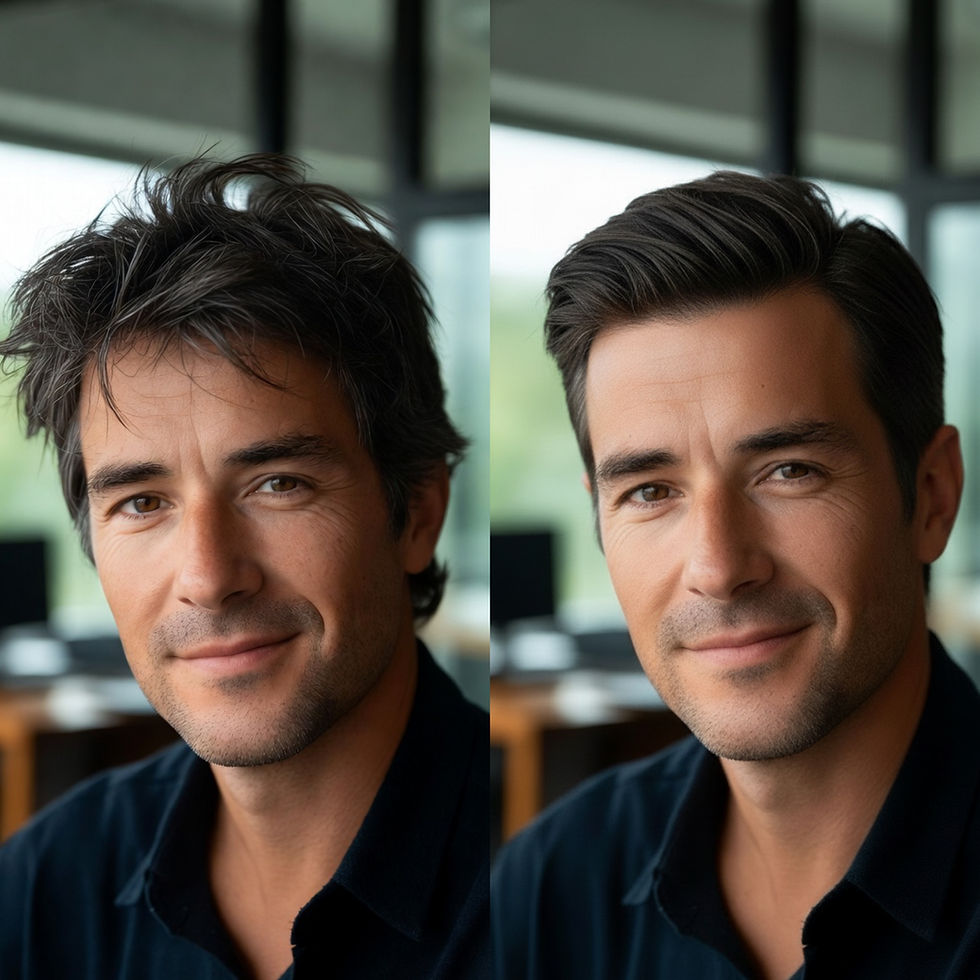
Best Men's Hairstyle Apps in 2026: 8 Apps Compared

Updated: 7 minutes ago
Looking for the best men's hairstyle apps in 2026? The right app lets you preview a new haircut on your own photo before you commit. Whether you're considering a low taper fade, a textured crop, a buzz cut, or longer hair, trying different looks virtually can help you decide what to ask your barber for.
HairLook lets you try hairstyles inspired by photos and screenshots, making it easier to explore different looks before committing to a haircut. Fotor offers AI hairstyle and beard experimentation, while FaceApp provides quick hair and beard filters. Google Gemini and Krea provide alternatives for experimenting with custom hairstyle ideas using AI. When comparing apps, look for realistic results that preserve your facial features, especially your jaw and eyes, since even small changes can affect how a short haircut looks.
We compared eight men's hairstyle apps based on their features, pricing, free options, and platform availability, using official websites and US App Store listings checked on October 27, 2026. As the creators of HairLook, we've included our app while also highlighting where alternatives may be a better fit. For more options, explore our guide to the best AI hairstyle apps for men and women.
Quick Comparison: 8 Best Men's Hairstyle Apps in 2026
App | Platforms | Free Option | Paid Price | Best For |
HairLook | iOS, Android | One free style | Pro: $6.99/week | Realistic hairstyle previews using inspiration photos or screenshots |
Fotor | Web, iOS, Android | Credits for new users | iOS Pro: $6.99/week, $8.99/month, or $47.99/year | AI hairstyle and beard experimentation |
FaceApp | iOS, Android | Free filters; Pro unlocks additional features | iOS Pro purchases: $10–$100 | Quick hair-length and beard filters |
Google Gemini | Web, iOS, Android | Free edits with unpublished limits; 18+ | Paid Google AI plans | Custom hairstyle ideas from text prompts |
Krea | Web | Free hairstyle changer, as advertised | Paid plans for other tools | Quick AI hairstyle experiments |
TryHair.ai | Web | 5 try-ons at sign-up | From $9.99/month | Browser-based previews with 50+ men's styles |
Hairstyle AI | Web | None stated | $9 one-time | Generating multiple photos to compare hairstyles |
Your Perfect Hairstyle for Men | iOS | Some free styles | Style packs: $0.99; unlock all: $2.99 | Affordable hairstyle browsing |
Note: Prices, free-use limits, and platform availability may change over time and vary by region. Please check each app's official listing for the latest details.
What Matters in a Men's Hairstyle App?
Men's haircuts can differ in subtle but important ways. A low taper, a mid fade, and a high skin fade may all look like short haircuts, but the differences in fade height, length, and blending can change the overall result. The best hairstyle app for you should help you explore those details rather than simply apply a generic hairstyle filter.
When comparing men's hairstyle apps, look for four things:
Does it preserve your facial features? With a buzz cut or textured crop, the hairstyle may cover relatively little of your head. If an AI edit also changes your jawline, eyes, or cheekbones, it becomes harder to judge the haircut itself. Compare the result with your original photo.
Can you explore different fade heights and lengths? Terms like low taper, mid skin fade, and grade 2 describe different barbering choices. Look for an app that lets you experiment with the variations you want to compare.
Can you preview beard styles, too? If you wear facial hair, try comparing your haircut with different beard styles. The combination can change the overall balance of your look.
Does it work with your hair texture? Straight, wavy, coily, and tightly curled hair behave differently. Choose styles that reflect your natural texture, density, and growth pattern, rather than relying on a preview that doesn't resemble your hair.
The Best Hairstyle Apps for Men, Reviewed
1. HairLook
HairLook is an AI hairstyle try-on app that lets you explore men's haircuts using inspiration photos and screenshots. Upload a hairstyle you like and preview how it could look on your own photo before committing to a cut. It's useful for exploring styles such as fades, textured crops, buzz cuts, and other popular looks.
Platforms: iOS and Android.
Free: One free hairstyle try-on.
Paid: Pro costs $6.99 per week.
Good: Lets you use hairstyle inspiration photos rather than choosing only from a fixed catalog. Its realistic image previews help you explore different looks before visiting your barber.
Not so good: The free option is limited to one style, and continued use requires a subscription.
2. Fotor
Fotor is a general-purpose photo editor with a dedicated male haircut simulator. It lets men experiment with AI-generated hairstyles and beard looks, making it useful if you want to explore different combinations before your next barber appointment.
Platforms: Web, iOS, and Android.
Free: New users receive credits to try its tools.
Paid: The iOS Pro plan costs $6.99 per week, $8.99 per month, or $47.99 per year.
Good: Combines hairstyle and beard experimentation in one platform, with options for exploring different men's looks.
Not so good: Its credit-based system can limit how many styles you can generate and compare.
3. FaceApp
FaceApp is a photo-editing app with hair and facial-hair filters. Its men's hairstyle options include different hair lengths and textures, as well as beard and mustache effects. It's a convenient choice if you want to experiment with a quick visual change.
Platforms: iOS and Android.
Free: Some filters are available without a subscription.
Paid: US App Store Pro purchases range from $10 to $100, depending on the offer.
Good: Quick to use for exploring different hair lengths, textures, and beard styles.
Not so good: Its filters are less focused on specific barber terminology, so you may still need to explain the exact cut you want to your barber.
4. Google Gemini
Google Gemini lets you upload a photo and use written prompts to experiment with different hairstyles. Instead of choosing from a dedicated haircut catalog, you can describe the look you want, such as a low taper fade, textured crop, or longer layered style.
Platforms: Web, iOS, and Android.
Free: Image editing is available with limits that Google may change. Image editing requires a Google account, and users must be at least 18.
Paid: Additional access is available through paid Google AI plans.
Good: Flexible for trying specific hairstyle ideas and customizing details through text prompts.
Not so good: Results can vary between edits, and the AI may subtly change facial features or other parts of your photo.
5. Krea
Krea offers a browser-based AI hairstyle changer for experimenting with different looks. You describe the hairstyle you want, and the tool generates an edited version of your photo. It's an option for men who prefer experimenting online without installing another app.
Platforms: Web.
Free: Its hairstyle changer is advertised as free to use without signing up.
Paid: Krea offers paid plans for other tools.
Good: Convenient for quick hairstyle experiments without a lengthy setup.
Not so good: Results depend on your prompt, and there is no dedicated men's haircut catalog listed in the comparison.
6. TryHair.ai
TryHair.ai is a browser-based hairstyle try-on tool with more than 50 men's styles within its larger hairstyle library. It lets you experiment with different looks online, making it useful if you want to compare several options without downloading an app.
Platforms: Web.
Free: Five try-ons at sign-up.
Paid: Plans start at $9.99 per month.
Good: Offers a range of men's hairstyles to explore directly in your browser.
Not so good: The free allowance is limited, so comparing many different cuts may require a paid plan.
7. Hairstyle AI
Hairstyle AI generates a batch of hairstyle images from uploaded selfies, giving you several different looks to review. Rather than testing only one haircut at a time, you can scroll through the results and identify styles you might want to discuss with your barber.
Platforms: Web.
Free: No free tier is stated in the supplied comparison data.
Paid: $9 one-time.
Good: Useful for discovering different hairstyle possibilities and comparing multiple generated images.
Not so good: It is less suited to quickly testing one specific haircut repeatedly, and generating results may take time.
8. Your Perfect Hairstyle for Men
Your Perfect Hairstyle for Men is an iPhone app focused on men's hairstyle browsing. Its low-cost style packs make it an option for users who want to explore different looks without committing to an ongoing subscription.
Platforms: iOS.
Free: Some hairstyles are available for free.
Paid: Individual style packs cost $0.99, or you can unlock all styles for $2.99.
Good: Affordable, straightforward hairstyle browsing with low upfront costs.
Not so good: It is limited to iOS, and its focus is on browsing styles rather than the more flexible AI image-generation approach offered by some alternatives.
10 Men's Haircuts Worth Trying Before You Sit in the Barber's Chair
Before booking your next barber appointment, experiment with different haircuts to see which shapes and lengths you prefer. From clean fades and textured crops to classic short cuts and longer styles, each haircut creates a different look.
Compare the styles using similar photo angles and lighting so you can focus on the haircut rather than differences between pictures. With HairLook, you can try hairstyle inspiration from photos and screenshots on your own image to explore new possibilities before making a decision.
Here are 10 men's haircuts worth considering for your next look.
Which app should you use?
Choose based on what you want to try, rather than download counts alone.
Your situation | Use this | Why |
You want to experiment with hairstyles and beards together | HairLook | Preview different hairstyle and beard combinations on your own photo to find a look that complements your facial features. |
You want to experiment with different beard styles | HairLook or Fotor | Explore facial-hair looks alongside hairstyle options |
You want to try a hairstyle from a screenshot or inspiration photo | HairLook | Transfer a reference hairstyle onto your own photo |
You want to experiment with different glasses frames | HairLook | Explore frame styles and see how they complement your look |
You want to generate custom hairstyle ideas from text prompts | Google Gemini | Describe the haircut you want and generate an AI-edited image |
You want a quick online hairstyle experiment | Krea | Try its browser-based AI hairstyle changer |
You want to compare several men's hairstyles in your browser | TryHair.ai | Offers five try-ons at sign-up and a library of men's styles |
You want to browse hairstyles at a low one-time cost | Your Perfect Hairstyle for Men | Offers individual style packs and an unlock-all purchase |
Which Men's Hairstyle App Features Should You Look For?
The best men's hairstyle app depends on what you want to change. Some apps focus on quick photo filters, while others let you experiment with AI-generated looks or compare different hairstyle options. Here's what to consider.
If You're Choosing a Haircut or Hair Color
A low taper, textured crop, and buzz cut create different silhouettes, while changing your hair color can transform the overall effect.
HairLook lets you preview hairstyles inspired by photos and screenshots, as well as experiment with different hair colors. FaceApp offers quick hair-related filters, while Fotor provides AI hairstyle experimentation. Google Gemini is another option if you want to describe a specific haircut or color in a text prompt.
If You Want to Try Different Beard Styles
Your beard and haircut work together to shape your overall look. A short beard with a textured crop creates a different impression from a fuller beard with longer hair.
HairLook lets you experiment with beard styles alongside other appearance options. Fotor also offers AI beard experimentation, while FaceApp includes facial-hair effects. The available options and level of customization vary by app.
If You Wear Glasses
Glasses frames can change the balance of your overall look. Slim metal frames, bold rectangular glasses, and round frames each create a different style.
If you want to experiment with glasses frames alongside hairstyles, HairLook offers this combination. Other apps in this comparison may focus more on hairstyle previews, general photo editing, or prompt-based image generation, so check their current features if virtual glasses try-ons are important to you.
If You Want to Experiment for Free
If you want to explore ideas before paying for a subscription, compare the free options carefully. Krea advertises a free online hairstyle changer, Google Gemini supports image editing within usage limits, and HairLook includes one free hairstyle try-on. TryHair.ai offers five try-ons at sign-up, according to the comparison above.
Free access, usage limits, and available features can change, so check each app before deciding.
The takeaway: HairLook may suit you if you want to combine hairstyle inspiration, hair color, beard styles, and glasses-frame experiments. Fotor and FaceApp offer other approaches to appearance editing, while Gemini and Krea are worth considering for more flexible AI experimentation.
Mistakes Men Make When Using Hairstyle Apps
AI hairstyle apps can help you explore new looks, but a realistic preview doesn't guarantee that a haircut will suit your hair type or look exactly the same in real life. Avoid these five common mistakes before choosing your next style.
1. Choosing a Haircut Based Only on the Front View
A fade is as much about the sides and back as it is about the front. If an app doesn't offer multiple viewing angles, pay attention to the fade height, the shape around the temples, and how the sides blend into the top.
2. Trusting a Preview That Changes Your Face Shape
Some AI-generated images subtly alter facial features, including your jawline, eyes, or overall face shape. Compare each result with your original photo to make sure the hairstyle not an unintended change to your features is influencing your impression.
3. Ignoring Your Hairline
Different hairstyles draw attention to different parts of your hairline. A textured fringe can provide more forehead coverage, while a slicked-back style makes the hairline more visible. Choose a preview that reflects your actual hairline and consider how the style would look with your hair naturally positioned.
4. Choosing a Cut Your Hair Type Can't Support
Your hair's density, texture, length, and growth pattern all affect how a haircut looks in real life. A quiff may require enough length and density at the front, while curtain hairstyles generally need sufficient length to fall into place. Use AI previews as inspiration, then ask your barber whether your hair can achieve the result.
5. Showing Your Barber a Picture Without Knowing the Cut's Name
A reference photo is helpful, but specific details make it easier to communicate what you want. Save your favorite preview and identify the haircut, fade height, and approximate length on top. For example, asking for a low taper with around two inches on top and a textured finish gives your barber a clearer starting point than simply saying you want a short haircut.
Tip: Use hairstyle apps to narrow down your options, then consult your barber about what will work best with your hair type, face shape, and maintenance routine.
Frequently Asked Questions
What is the best app to try different hairstyles on yourself for men?
The best app depends on what you want to achieve. HairLook lets you preview hairstyles inspired by photos and screenshots on your own image. Fotor offers AI hairstyle and beard experimentation, while FaceApp provides quick hair and beard filters. For more customized ideas, you can try Google Gemini or Krea.
Is there a free hairstyle simulator for men?
Yes. Krea advertises a free online hairstyle changer, and Google Gemini offers image editing within usage limits. HairLook includes one free hairstyle try-on, while TryHair.ai offers five try-ons at sign-up. Free features and limits may change.
Can I try men's hairstyles without downloading an app?
Yes. Krea, TryHair.ai, Hairstyle AI, and Google Gemini offer browser-based options. Fotor also has a web version, so you can experiment with hairstyles on a phone or computer without installing a dedicated app.
How can I see what I would look like with a buzz cut?
Upload a clear, front-facing photo and select a buzz cut or very short hairstyle option. Make sure your hairline and head shape are visible so you can better judge the result. Remember that an AI preview is an approximation of how the cut might look in real life.
Should I show an AI hairstyle preview to my barber?
Yes. A preview of the hairstyle on your own photo can help communicate the look you want. Show your barber the image and, if possible, identify the haircut name, fade height, and approximate length on top. Your barber can then adapt the style to your hair type and head shape.
Are AI hairstyle apps accurate?
AI hairstyle apps can be useful for exploring options, but results are not always exact. Some previews may subtly change facial features, hair texture, or hairline details. Use the images as a guide rather than a guarantee, and ask your barber whether the style will work with your natural hair density, texture, and growth pattern.